Transfer profiles#
You can move one or more profiles to another 9Login account, together with their fingerprint and the
data synced to the cloud, such as cookies and login sessions. This is a move, not a copy: once the
recipient clicks Accept, the profiles leave your account and you cannot get them back.
Requirements#
- Both the sender and the recipient must have a paid plan. On the Free plan, the transfer button on the toolbar is grayed out.
- Only the account owner can send and receive. Sub-users see neither the transfer button nor
Transfers. - Profiles must be stopped. Running profiles are left out of the transfer.
The data that goes along is the copy currently in the cloud. If a profile shows a cloud icon with an up
arrow (this computer has data that is not in the cloud yet), click Upload data before sending, see
Cloud data.
Send profiles#
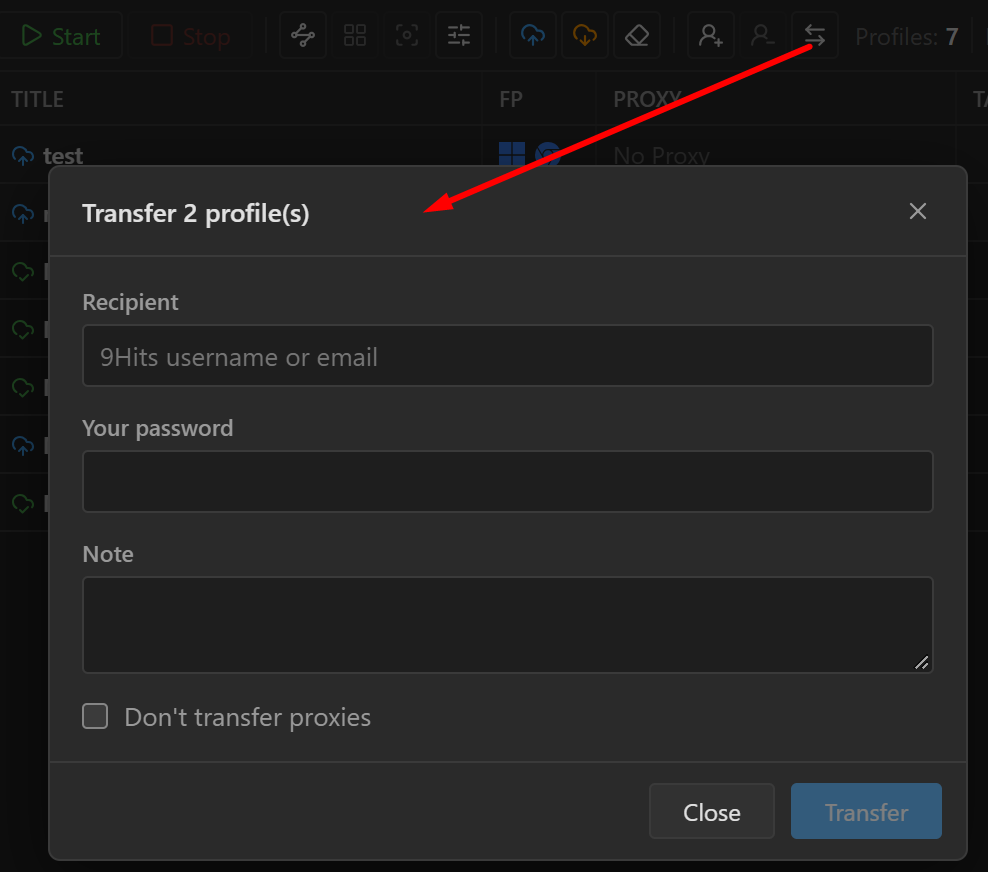
- Check the profiles to move, then click the transfer button on the toolbar (the icon with two arrows pointing in opposite directions).
- Fill in the
Transfer N profile(s)box:Recipient: the recipient's 9Hits username or email.Your password: enter your 9Hits password again.Note: a note for the recipient, optional.Don't transfer proxies: check this if you do not want to send manually entered proxies along (see the section below).
- Click
Transfer, read the confirmation box, then clickTransferagain.
Sent profiles change status to Transferring. If some profiles were left out, usually because they are
open on another computer or already part of another transfer, the app shows N profile(s) were left out.
| Message | What to do |
|---|---|
Wrong password. |
Enter your 9Hits password again, correctly. |
This account cannot receive profiles. |
Check the username or email. The recipient must be a different account with an active paid plan. |
What goes along and what is dropped#
Goes along: name, tags, fingerprint, profile settings and cloud data.
Dropped:
- proxies picked from the list (
From my list), includingCustom scriptproxies; - extensions;
- scripts;
Inject Script.
Manually entered proxies (HTTP, SOCKS4, SOCKS5, SSH) go along, including the user and
password, unless you check Don't transfer proxies.
While you wait#
A profile waiting to be transferred is locked: you cannot open it, edit it, or upload or download its
data. Hover over the Transferring status to see who it is waiting for.
If you change your mind, open the profile's three-dot menu and choose Cancel transfer, or go to
Transfers, the Outgoing section, and click Cancel. Canceling cancels the whole transfer: every
profile in it goes back to normal.
A transfer expires after 24 hours if the recipient does not respond, and the profiles also go back to normal.
Receive profiles#
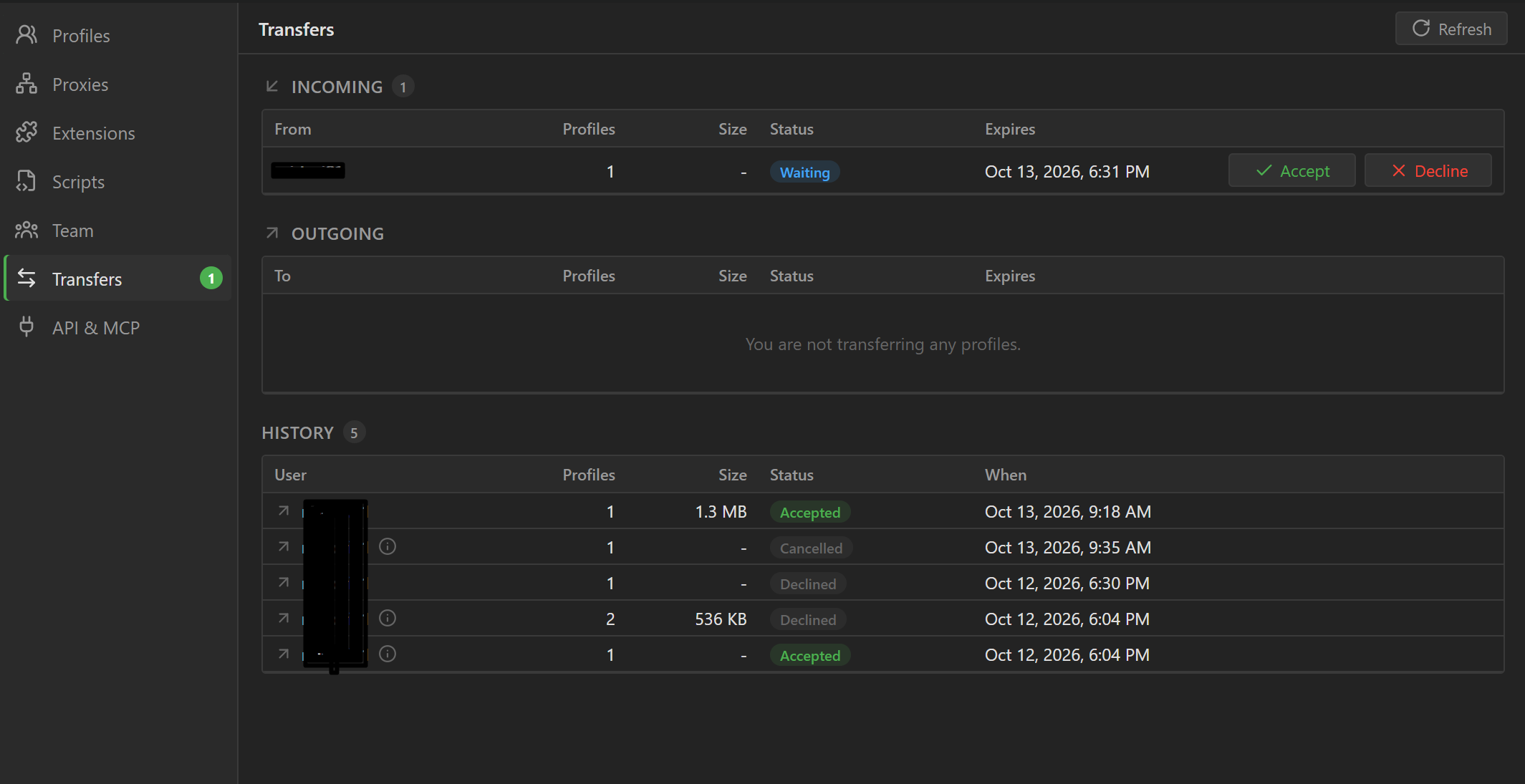
When a transfer comes in, Transfers in the sidebar shows the number of pending transfers. This screen
has three sections:
Incoming: transfers sent to you, with the sender, number of profiles, data size and expiry. Hover over the i icon next to the sender's name to read the note.Outgoing: your transfers, waiting for the other person to accept.History: finished transfers, with a status such asAccepted,Declined,Cancelled,Expired.
Click Accept to receive, or Decline to refuse (the app asks you to confirm before declining).
Receiving is all or nothing: your plan must have enough room for the whole batch, including cloud data storage. If there is not enough room, none of the profiles is received.
After you receive#
Received profiles get an extra tag from-<sender's username>; type this tag in the search box to
filter them. The first time you open one, the app offers to download its cloud data (or downloads it
automatically if you have Sync automatically on).
The recipient needs to redo what was dropped:
- Profiles that lost their proxy show
Entry deletedin thePROXYcolumn and cannot open until you pick a new proxy, see Manage proxies. - Reinstall the extensions you need and turn them on for the profile, see Manage extensions. The extensions' old data (for example crypto wallets) is still in the cloud data.
- Attach scripts and
Inject Scriptagain if needed.
The sender may still have a copy of the cookies from before the transfer. If you receive profiles that are already logged in to accounts, change the passwords of those accounts.